Q1. (a) . Write steps to open the calculator in windows.
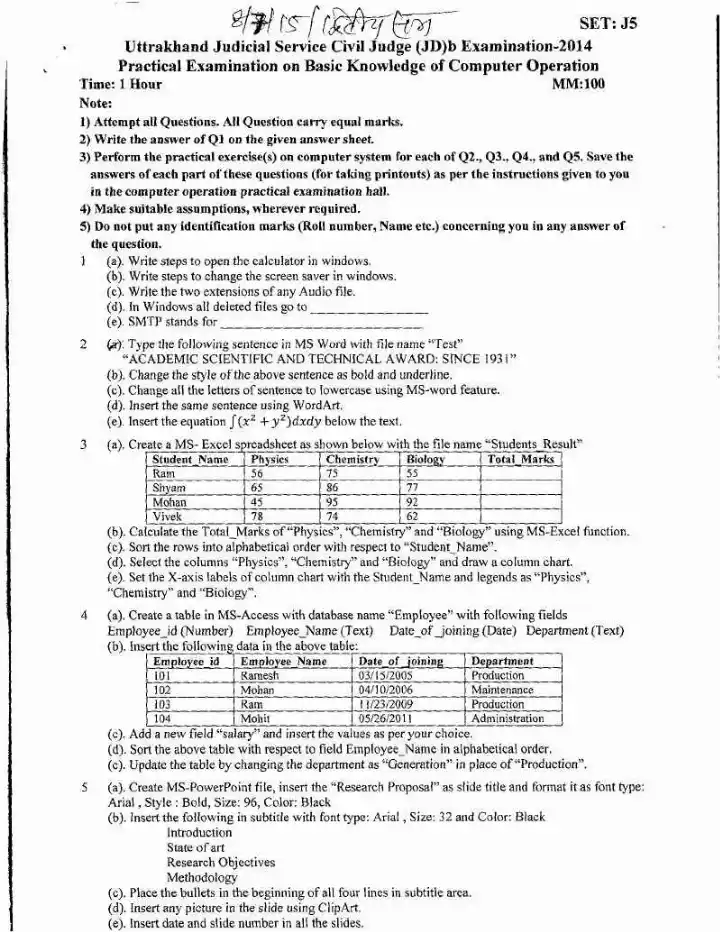
(a) . Write steps to open the calculator in windows.
(b) . Write steps to change the screen saver in windows.
(c) . Write the two extensions of any Audio file.
(d) . In Windows all deleted files go to
(e) . SMTP stands for
- (a) . Write steps to open the calculator in windows.
- (b) . Write steps to change the screen saver in windows.
- (c) . Write the two extensions of any Audio file.
- (d) . In Windows all deleted files go to
Q2. (a) . Create a MS-Excel spreadsheet as shown below with the file name "Students Result".
(a) . Create a MS-Excel spreadsheet as shown below with the file name "Students Result".
(b) . Calculate the Total_Marks of "Physics", "Chemistry" and "Biology" using MS-Excel function.
(c) . Sort the rows into alphabetical order with respect to "Student Name".
(d) . Select the columns "Physics", "Chemistry" and "Biology" and draw a column chart.
(e) . Set the X-axis labels of column chart with the Student Name and legends as "Physics", "Chemistry" and "Biology".
- (a) . Create a MS-Excel spreadsheet as shown below with the file name "Students Result".
- (b) . Calculate the Total_Marks of "Physics", "Chemistry" and "Biology" using MS-Excel function.
- (c) . Sort the rows into alphabetical order with respect to "Student Name".
- (d) . Select the columns "Physics", "Chemistry" and "Biology" and draw a column chart.
Q3.
(a) . Create a table in MS-Access with database name "Employee" with following fields: Employee id (Number), Employee Name (Text), Date of joining (Date), Department (Text).
(b) . Insert the following data in the above table: Dateof joining Employee id 101 03/15/2005 Production; 102 Mohan 04/10/2006 Maintenance; 11/23/2009 103 Production Ram; 104 05/26/2011 Mohit Administration.
(c) . Add a new field "salary" and insert the values as per your choice.
(d) . Sort the above table with respect to field Employee Name in alphabetical order.
(e) . Update the table by changing the department as "Generation" in place of "Production".
Q4. (a) . Create MS-PowerPoint file, insert the "Research Proposal" as slide title and format it as font type: Arial, Bold, Size: 96, Color: Black
(a) . Create MS-PowerPoint file, insert the "Research Proposal" as slide title and format it as font type: Arial, Bold, Size: 96, Color: Black
(b) . Insert the following in subtitle with font type: Arial, Size: 32 and Color: Black Introduction State of art Research Objectives Methodology
(c) . Place the bullets in the beginning of all four lines in subtitle area.
(d) . Insert any picture in the slide using ClipArt.
(e) . Insert date and slide number in all the slides.
- (a) . Create MS-PowerPoint file, insert the "Research Proposal" as slide title and format it as font type: Arial, Bold, Size: 96, Color: Black
- (b) . Insert the following in subtitle with font type: Arial, Size: 32 and Color: Black Introduction State of art Research Objectives Methodology
- (c) . Place the bullets in the beginning of all four lines in subtitle area.
- (d) . Insert any picture in the slide using ClipArt.